Lists - EZ Address Book Software
| Home | Features and FAQ | Order and Download | Testimonials | FREE Trial | Watch Demos |
|
EZ Home and Office Address Book
v10.0
$29.95
Add, display, and print any number of lists. You can create a To Do List, Vacation List, Hurricane Preparation List, or any list you want. Adding and changing a list is easy. There are several formatting options and reordering a list is a breeze. The report is indented for punch holes when printed. A list can also be exported to a PDF file. |






Address Book Lists
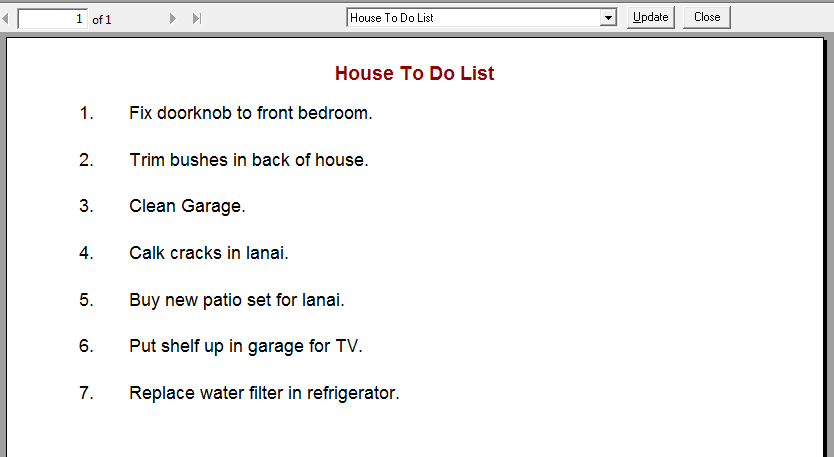
You can create a "To Do" list, a "Hurricane Preparation" list, "Things to Take on Vacation" list, or any list you want. Click 'Update' to add, change, and delete lists. The report is indented for punch holes when printed.
Clickon the toolbar, use Ctrl+P, or select 'Print' from the File Menu to print the list.
You can change the font and font size for the report on the toolbar. Select 'Options' from the Tools Menu to change the report colors, set the default zoom, and select whether you want to display the current date and/or page number at the bottom of the report. All reports use the same options.
ElwoodSoftware.com has a Shopper Approved Rating of 4.9 out of 5 based on 718 Ratings and Reviews
Copyright © 2023 Elwood Software. All Rights Reserved. Your Privacy is Always Protected.
Elwood Software, 21539 Brixham Run Loop, Estero, FL 33928 Support@ElwoodSoftware.com