Picture Gallery - EZ Address Book Software
| Home | Features and FAQ | Order and Download | Testimonials | FREE Trial | Watch Demos |
|
EZ Home and Office Address Book
v10.0
$29.95
Home >
Features >
Picture Gallery
|







Picture Gallery with Slide Show
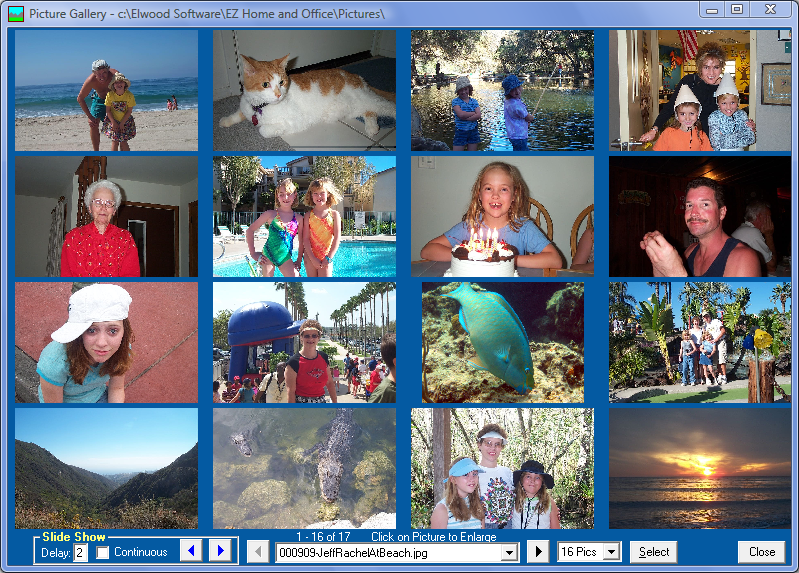
Clickon the toolbar or select 'Picture Gallery' from the Features Menu to view pictures on your computer by directory. The default directory for viewing pictures is the EZ Pictures Directory but you can click 'Select' to choose another directory on your computer. Pictures are automatically copied to the EZ Pictures Directory when a picture is selected on the EZ Address Book Screen. Pictures can also be copied to the EZ Pictures Directory by selecting 'EZ Pictures Directory' from the Tools Menu. JPG, JPEG, GIF, and BMP files can be viewed.
Select a picture to view from the drop-down list or clickor
. You can view 1, 4, or 16 pictures at a time by selecting from the drop-down list. The Picture Gallery Screen can be maximized or resized.
To run the Slide Show, enter a 'Delay' in seconds between pictures, check if you want the Slide Show to be 'Continuous' (start over when the end is reached), and click either the forward or backward button. Clickto stop the Slide Show.

ElwoodSoftware.com has a Shopper Approved Rating of 4.9 out of 5 based on 718 Ratings and Reviews
Copyright © 2023 Elwood Software.
All Rights Reserved.
Your Privacy is Always Protected.
Elwood Software, 21539 Brixham Run Loop, Estero, FL 33928
Support@ElwoodSoftware.com